Academic Traces | Games Programming 1 Report
Game Overview
It’s a very simple and fun game of picking up various items and then throwing them at your enemies. You’ll need to explore the different rooms to find a way to get into the final room, break the crystal and destroy all the enemies!
Game Analysis
The game I have chosen as a reference is Doungeonball, and I will describe what kind of characteristics each part has one by one by categorisation, and then elaborate on the techniques through which I have remade them.
1. Player-controlled character
1.1. Character control
1.1.1. The player uses the four W/A/S/D buttons to control the movement of the character, and when moving the arm will have an animation that follows the swing.
Remake overview:
I first added the CharacterController component to the corresponding character object, and then used characterController.Move() to implement the character's movement. For the arm following, I used Vector3.Lerp() and Quaternion.Slerp() to smooth the displacement and rotation of the moving arm to get the effect of delayed arm following. For the swing of the arm while moving, I instead calculate its angle by Mathf.Sin(Time.time * swingSpeed) * swingAmount * moveInput and add it as an offset to the smooth rotation of the arm following the camera.
1.1.2. The player can pick up items that the camera is pointed at, and the corresponding arm will have an extension animation when picking up: the arm extends to the position where the item is, holds the item in place in the hand, and then the arm retracts.
Remake overview:
I first get the object the camera is pointing at via Physics.Raycast(playerCamera.transform.position, playerCamera.transform.forward, out hit, interactDistance) , then I determine if this is an object that can be picked up by using the GetComponent<>() to detect if the object contains a specific component. If the object can be picked up, the arm handles the animation of its pickup via a Coroutines. In the Coroutines the arm uses Vector3.Lerp() to smooth the scaling of the z-axis to extend and shorten. After the arm is extended, it calls the pickup function in the object's Item script to pick up the object.
1.2. Injuries to characters
1.2.1. The character will lose HP when attacked.
Remake overview:
The damage value caused by the attack is written in the item objects that can be used as weapons, when these item objects collide they will detect if the colliding object is using the Health script, if it is, a function in this script will be called to subtract the damage value from the player's HP value. Then it determines if the character's HP is less than or equal to 0 at that point, and if it is, it goes on to call the death function. In addition to this, I've added particle effects and sound effects to clearly signal the player when the character is injured.
2. Enemy characters
2.1. Slime
2.1.1. When the player-controlled character gets within a certain range, the Slime will jump forward towards the player via AI navigation.
Remake overview:
In order to implement AI navigation, all enemy characters have been added the NavMeshAgent component. When the game starts the enemy character object will automatically search for the player object using GameObject.FindGameObjectWithTag(‘Player’) and then calculate the distance between the player and the enemy character using Vector3.Distance() . If this distance is less than the detection distance and larger than the stopping distance, the enemy character will use agent.SetDestination(player.position) to move towards the player. When this distance is less than the stopping distance, the enemy character calls the attack function to attack the player. In the original, the Slime moves with a jump animation, but I didn't reproduce the Slime's jump animation because I wasn't proficient enough with the animation system.
2.1.2. When near the player, the Slime will jump and attack the player.
Remake overview:
When the attack function is called, it first determines whether the current time is larger than the time of the last attack plus the cooldown, and whether it is currently in a stunned state. If it is possible to attack, the Slime calls the take damage function in the player's Health script, and then handles the attack animation via the Coroutines. In the Coroutines the Slime also uses Vector3.Lerp() to animate its displacement.
2.1.3. Dies when hit and a particle effect appears.
Remake overview:
The injury code for the enemy character is the same as for the player and can be found in 1.2.1. In the death function of the enemy character, Instantiate() is used to generate particle effects and sound prefabs corresponding to the death.
2.1.4. Slimes can be picked up by the player and thrown as weapons. Slimes die after being thrown and creating a collision.
Remake overview:
This part is implemented in a similar way to the other items, as can be seen in 3.1.1. Two differences are that the Slime is additionally disabled from its Attack, Movement and NavMeshAgent components to prevent the Slime from moving even after it has been picked up, and that, after finally generating a collision, the Slime calls the death function in its own Health script, instead of directly using the Destroy() .
2.2. Ghost
2.2.1. When the player-controlled character gets within a certain range, the ghost will advance towards the player via AI navigation.
Remake overview:
This section uses the same code as the Slime and can be found in 2.1.1.
2.2.2. After approaching a certain distance from the player, the ghost will throw the ball.
Remake overview:
When a ghost launches an attack, it gets the Item script of its child object (the item it is holding) via GetComponentInChildren<Item>() , and then calls the throw function in it.
2.2.3. After throwing the ball, the ghost will look for items around it and then pick them up.
Remake overview:
When the ghost doesn't have a ball in its hand, it will look for all objects in range that are in a particular layer via Physics.OverlapSphere(transform.position, itemDetectionRadius, itemLayer) and create an list of objects based on the results. The ghost then traversal over this list and calculates the distance of each object from itself and finally finds the closest object. After that, the ghost will use agent.SetDestination() to move to the closest object, and when it moves to a certain distance, it will call the pickup function in the object's Item script to pick up the object.
2.2.4. Dies when hit and a particle effect appears.
Remake overview:
Same as Slime, see 2.1.3 and 1.2.1.
2.3. Bat
2.3.1. When the player-controlled character gets within a certain range, the bat will advance towards the player via AI navigation.
2.3.2. When close to the player, the bat will crash and attack the player.
2.3.3. Dies when hit and a particle effect appears.
2.4. Flame monster
2.4.1. When the player-controlled character gets within a certain range, the flame monster will advance towards the player via AI navigation.
2.4.2. After approaching a certain distance from the player, the flame monster will fire fireballs.
2.4.3. Dies when hit and a particle effect appears.
重制概述:
The Bat and Flame Monster were not remade because the time to make them was not particularly plentiful. While making them I realised that bats have some similarities to slimes and flame monsters have some similarities to ghosts, so I only made slimes and ghosts to save time.
3. Items
3.1. Ball and Key
3.1.1. Can be picked up.
Remake overview:
After being picked up, the ball's collider will be disabled, then set as a child of the character's hand object, reset position, rotate and scale, and lastly its isKinematic will be set to true to prevent movement.
3.1.2. Colliding characters can do damage.
Remake overview:
The ball uses collider to generate damage. When a collision is generated, the ball first detects if the collision object uses the Health script, and if it does, it calls the take damage function in the script.
3.1.3. It can be bounced after being thrown, and has a particle effect and glows when it bounces.
Remake overview:
To achieve the bounce effect, the ball is given a physics material with a bounce of 1. After each collision generated by the ball, the location where the collision was generated is obtained via collision.contacts and a particle effect is generated at that location.
3.2. Liquid
3.2.1. Can be picked up.
Remake overview:
Same principle as the ball.
3.2.2. Restores HP after use.
Remake overview:
The function to restore HP is written in the Health script and is called when liquid is used.
3.3. 3.3. Other items (rocks, jars, books, etc.)
3.3.1. Can be picked up.
Remake overview:
Same principle as the ball.
3.3.2. Colliding characters can do damage.
Remake overview:
Same principle as the ball.
3.3.3. It breaks after being thrown and collided with once.
Remake overview:
The script that controls item damage contains a bool variable that controls whether or not other items can do damage and be destroyed (preventing these items from being destroyed by colliding with the ground when starting the game). When the player or enemy throws these items, this variable is set to true so that these items can do damage and then be destroyed on the next collision.
3.4. Bomb (new gameplay)
3.4.1. Can be picked up.
Remake overview:
Same principle as the ball.
3.4.2. When thrown and colliding, it does damage to all enemies in range and impacts all objects in range.
Remake overview:
The principle is similar to that of other items, see 3.3.3. The difference is that when a bomb is thrown and collides, it detects all objects within the explosion range via Physics.OverlapSphere() and traverses them to see if they contain a Health script, and if so, calls the take damage function therein. The traversal also detects if the object contains a Rigidbody component, and if so, uses AddExplosionForce() to generate an impact force on the object.
4. Scenes
4.1. Procedural generation of scenes
Remake overview:
Procedural generation of scenes is a bit difficult for me to remake for now. But I did try to implement randomisation of parts of the scene. I wrote a script specifically for randomly generating prefabs within a certain range, where the range, amount, and angle of generation can be freely controlled. In the future, if updates continue, it can be used to change the number of decorations, items, and enemies within a level, thus enabling changes in difficulty. Currently the script is only applied to decorations and items within the game, as the enemies within the scene need to be associated to the general doors in order to realise the functionality of the general doors.
4.2. Final door, opened when hit by the key.
Remake overview:
The OnCollisionEnter event is included in the script for the final door, and when the object that generated the collision has a tag of Key, the final door is moved by Vector3.Lerp() , and then the colliding object destroyed.
4.3. General door, shatters and disappears when attacked
Remake overview:
The general door in the original game will shatter after an attack. This effect has some difficulty and is hard to implement. However, to ensure gameplay, I associated general doors with enemies. The script for the general door traverses through all the associated enemy objects, and when the objects are all empty, i.e. the enemies are all dead, the door moves and opens.
4.4. The end crystal, when hit, spawns a large number of enemies. Killing all enemies will clear the level.
Remake overview:
In order to implement the effect of spawning enemies when the crystal is hit, I have attached the Health script and the above mentioned prefab spawning script to the crystal, where the prefab spawning script is disabled. The crystal has a HP of 1 and will ‘die’ when hit. The prefab generation script is activated in its death function, which generates enemies. This script also contains code that traverses all generated objects in real time and destroys itself when all enemies die. All crystal objects are referenced in the scene management script, which also traverses all crystal objects and displays the pass menu when all objects are empty, i.e. all crystals are destroyed. Currently the levels in the game only use one final crystal, but based on the above script, it will be easy to add more crystals to the levels in the future to increase the difficulty.
Playtesting
I used a collection form to gather the results of the playtest and here is some feedback:
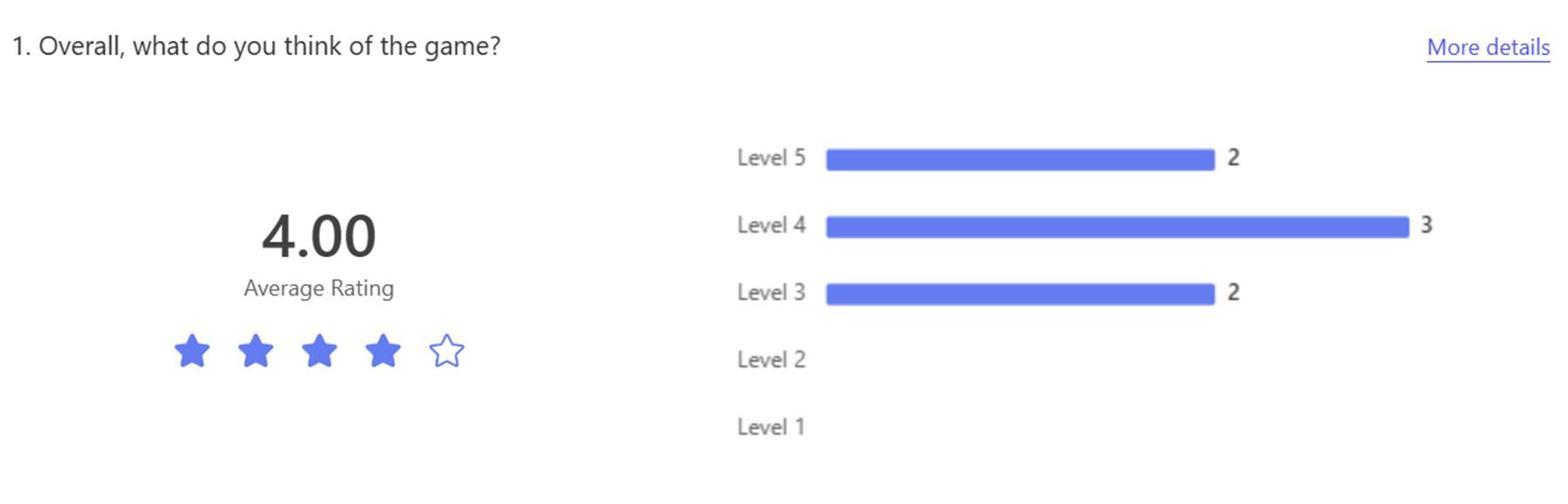
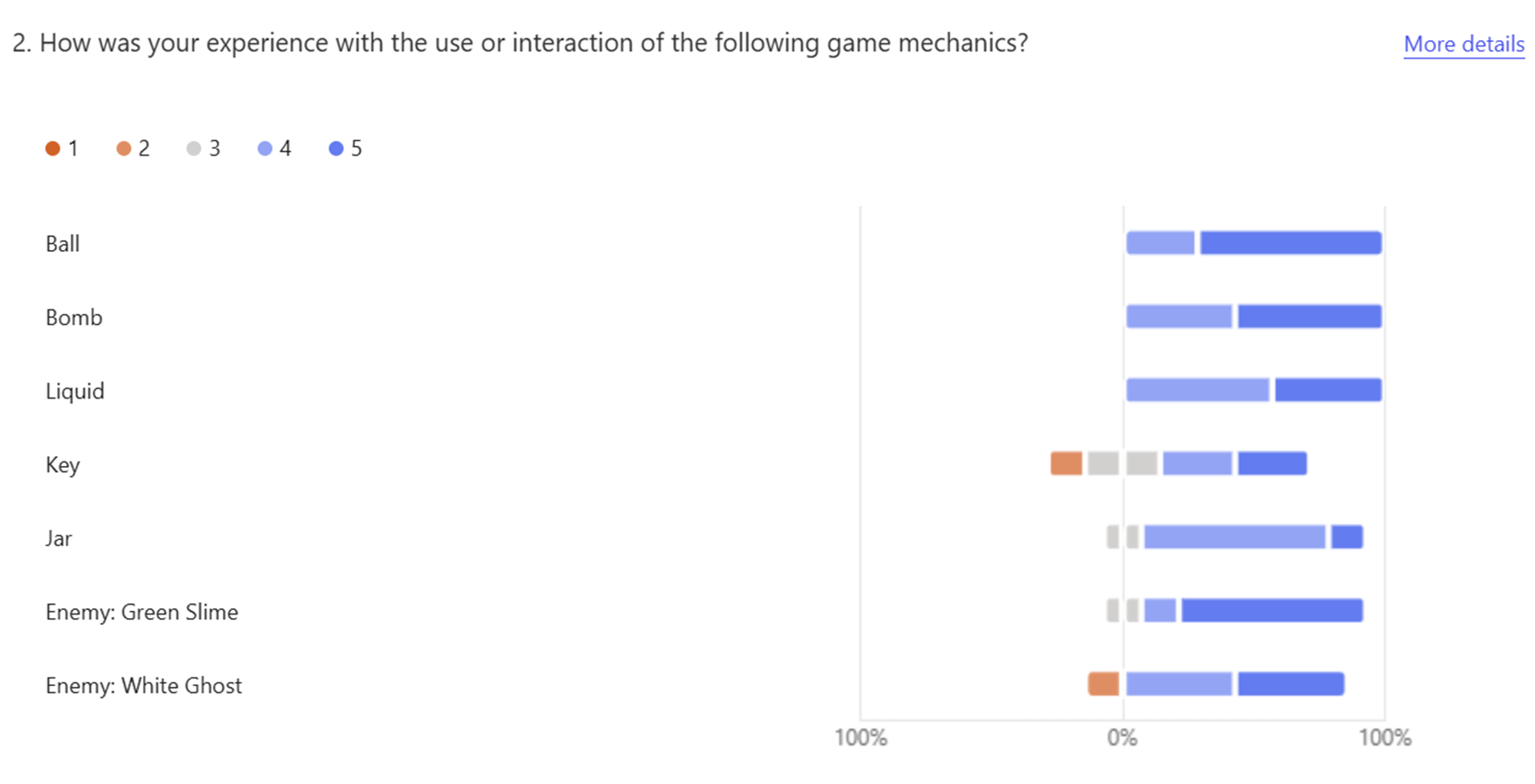
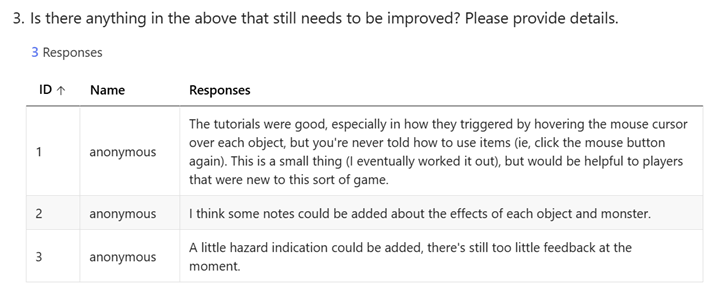
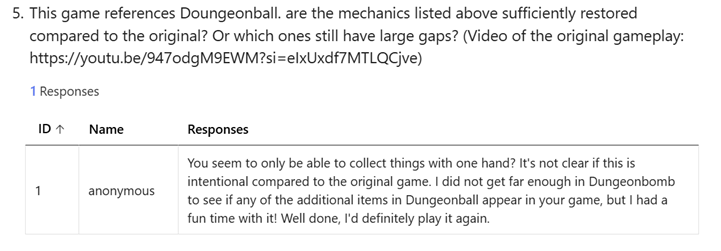
Optimisation suggestions focused on hint messages. Most agreed that there were not enough hint messages in the game to know how to use the items. This may also be the reason why the scores for Key are so low, the player doesn't know how to use the key to open the door. To address this issue, I added new hint text underneath the arms on the screen to inform which button is used to control each of the two arms, and to inform how to use the items in your hand or what effect they have.
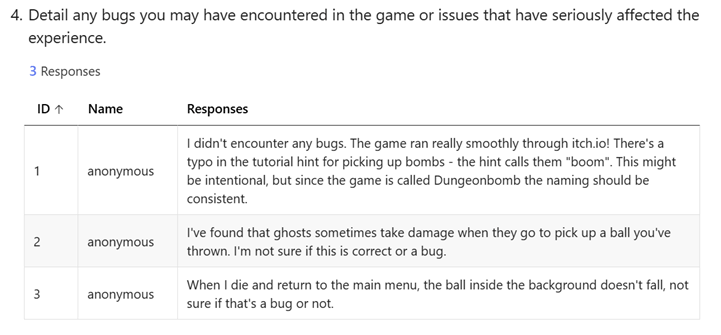
One of the issue feedbacks states a problem with ghosts when picking up items, which is indeed the correct phenomenon. It's just that the current in-game enemy AI isn't smart enough to dodge the movement of the ball, thus always actively bumping into the ball and then taking damage. The other two minor bugs have been fixed.
In comparison to the original, it seems that this player didn't know that both arms could be used because of too little hint information. However, I have now added tutorial information and hint text, and new players will easily know how to use the arms.
Known Issues
1.There are still some holes in the current Ghost's logic for picking up items. The ghost will detect the nearest item and move towards it after throwing the ball. If the player picks up the ghost's target item at this time and throws it at the ghost, the item will be directly picked up by the ghost without doing any damage to the ghost. This is because the ghost's pickup logic directly completes the act of picking up the target item when its distance from itself reaches a certain value without making any other judgement (the ghost can't tell if the ball was thrown at it by the player or if it was on the ground). I haven't come up with a better pickup logic at the moment. I've also been adding bool variables to items to mark whether the ball was thrown by the player or was on the ground, but when to change this variable is also a new problem, so I'll have to give up on solving that for now.
2. There are also some minor issues with the current enemy AI Navigation. NavMesh needs to be baked in advance of the scene, but some of the decorations in the scene (such as tables and barrels) are generated after the start of the game, resulting in enemies unable to get around these decorations when use AI Navigation. While this issue doesn't affect gameplay, it can lead to situations where an enemy advances against the decorations or throws a ball that bounces off the decorations and injures itself. I have not found a solution to this issue at this time.
3. 3. When the ghost is hit, there is probability that it will be knocked away and then stuck spinning in a corner. The cause of the problem has not been found yet, and speculation is that it may be due to being knocked out of the NavMesh area.
Accessibility and impact
The scenes in my game are rather dim and the contrast is not strong enough, which may make it an unsuitable game for some people with amblyopia and people with color blindness. For these groups, it might be possible to solve this problem by adding new colour modes, adjusting the lighting settings and improving the colour contrast. It is also not suitable for all visual impairment groups because of the lack of audio hints. Solving this problem may require adding more hint sound effects and presenting them in a spatial audio format.